
Our blog
The latest news from our team at Clever Dynamics

Clever WMS Containers v2.0 Is Here – For Smarter, Faster, More Visible Warehouse Operations
Poor container visibility, manual handling, and inconsistent tracking can slow warehouses down and cause costly errors. When teams can’t quickly see what’s inside a pallet, tote, or stillage - or where it’s been - productivity takes a hit. Clever WMS Containers v2.0 is designed to change that.
Built for container-led warehouse operations in Microsoft Dynamics 365 Business Central, the latest release of Clever WMS Containers delivers faster processing, clearer container-level visibility and greater control across all warehouse activities. Whether you’re handling pallets, totes, stillages, or boxes, version 2.0 removes friction from everyday workflows. Containers can be created, moved, split, consolidated, and tracked directly within standard Business Central processes -helping teams move stock in bulk, reduce manual effort and always know where containers are and what they contain.
Now available as a standalone app, Clever WMS Containers v2.0 is easier for partners to deploy, upgrade, and support - reducing complexity while giving customers a flexible, future-ready warehouse solution.
Who does this update help?
Clever WMS Containers v2.0 is built for Business Central partners supporting warehousing customers who:
• Manage stock by pallet, tote, or stillage and need better container level visibility
• Rely on reusable or returnable containers and want stronger tracking and control
• Expect full warehouse process coverage without customisation or workarounds
• Want a standalone, upgrade-friendly app that’s easier to deploy and support
So what's new?
The latest release of Clever Containers contains enhancements that both simplify and strengthen container processes, reducing manual effort while improving visibility and control. Here's what's new:
• Standalone app for easier deployment and upgrades, simplifying upgrades and reduces support overhead for partners
• Containers supported across all Business Central warehouse processes, meaning Partners can now deploy container tracking without custom workarounds
• Faster container creation and retrieval directly in documents
• Full support for reusable containers
• Improved container visibility and posting insight
- Faster and More Consistent Onboarding
Getting started is now easier than ever thanks to an improved Assisted Setup and a more consistent onboarding experience across Clever apps. When enabling Containers, users are guided more clearly through the initial setup process.
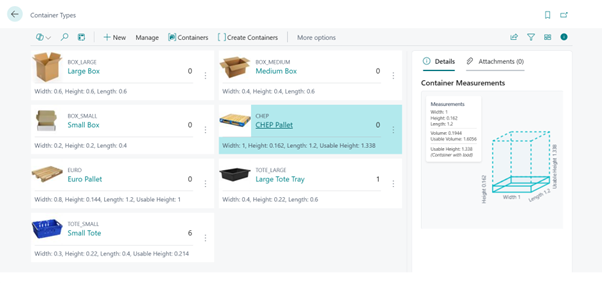
- Container Tracking Across Every Warehouse Process
Clever WMS Containers v2.0 now works across all Business Central warehouse processes meaning container operations can now be performed within all standard Business Central functions as well as on Clever WMS Devices.
Container handling has been extended and improved across multiple areas, including Transfer Orders, Purchase Return Orders, Production component picking and journals and Project (Job) picking (with container tracking entries created against Project Planning Lines).
Containers now support additional warehouse documents such as Internal Movement, Internal Pick, and Internal Put away documents. This ensures consistent container handling even when processing warehouse transactions without mobile devices.
Warehouse Picks now offer better defaulting and usability for container fields, especially when working with container tracked shipment bins. Validation blockers have been reduced, making it easier to complete pick and place lines efficiently.
Reclassification Journals and Warehouse Reclassification Journals now offer improved container handling allowing the option to consolidate, split and change containers in addition to moving containers across locations (or bins).
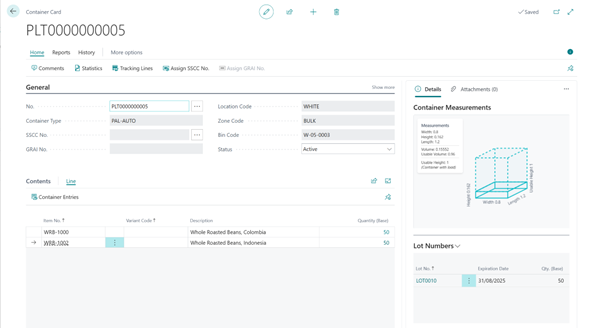
- Faster Container Creation and Content Retrieval
Processing containers with documents and journals has also been significantly improved. Users can now create new containers and print container labels directly from within warehouse documents, without needing to leave the process to pre create containers elsewhere.
A new feature “Get Container Contents” alongside expanded “Show Container Contents” options has been introduced so container lines can now be retrieved directly on key pages including Transfer Orders, Movement Worksheets, Internal Movements, Put aways, and Item Journals meaning warehouse users can pull container contents into documents quickly and accurately, similar to working with bin contents – saving time and reducing errors.
- Support for Reusable Containers
Clever WMS Containers v2.0 adds full support for reusable containers. Container types can be defined as reusable, with functionality to track returns rather than treating containers as disposable. This is ideal for returnable pallets, totes, stillages, jigs, and other valuable assets.
- Greater Visibility and Confidence
Visibility has been significantly improved, giving users clearer insight through item availability by container, enhanced container statistics, and container entries that are now visible in Posting Preview and Find Entries (Navigate). Together, these enhancements make it easier to understand container level availability, review posting impacts, and reconcile movements with confidence.
- Designed for Container-led Warehousing
Clever WMS Containers is designed to support container led warehouse operations by grouping items into uniquely identified containers. This allows stock to be moved in bulk, reduces manual handling, and ensures warehouse teams always know where containers are and what they contain.
If you’re looking to improve traceability, speed up picking and shipping, or gain better control over reusable containers, Clever WMS Containers v2.0 delivers the tools to do exactly that. Head on over to Microsoft Appsource to download your free trial or to the docs site for further details of this latest app update. If you have any questions, please do not hesitate to get in touch.
COMPILED ON